
An optimal office setup extends beyond basic furniture arrangement—it represents a systematic approach to organizing physical, digital, and psychological resources supporting consistent professional performance. Whether your office serves as your primary workspace or occasional remote work location, strategic setup optimization eliminates friction points that accumulate into frustrated afternoons. This guide explores the essential components transforming good offices into exceptional workspaces where productivity flows naturally.
Desk Configuration and Work Surface Design
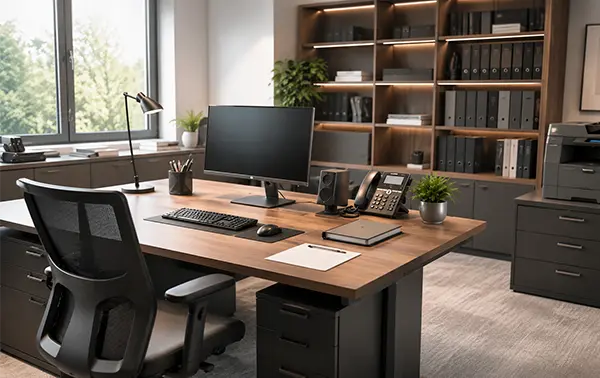
Your desk serves as the foundation for daily professional activity, yet many setups prioritize appearance over functional optimization. Mond Office designs desks incorporating practical features supporting actual work rather than theoretical ideals. Adequate surface area prevents cramped working conditions where essential items constantly jockey for limited space.
Monitor positioning proves crucial for extended screen work. Proper positioning at arm’s length with top of screen at or slightly below eye level prevents neck and eye strain accumulating into afternoon fatigue. Multiple monitor configurations support efficiency in information-intensive work where multitasking between applications saves constant window-switching time. Desk depth enabling comfortable monitor distance while maintaining elbow clearance for keyboard and mouse use prevents postural compromises from shallow work surfaces.
Seating Quality and Ergonomic Support
Quality seating represents one of the highest-ROI office investments, yet many professionals sacrifice comfort for budget considerations. Eight hours daily in uncomfortable seating generates cumulative strain manifesting as chronic pain, reduced focus capacity, and afternoon energy crashes. Mond Office office seating combines lumbar support, armrest positioning, and seat cushioning creating genuine comfort enabling extended focus without physical discomfort.
Seat height adjustment enabling neutral thigh positioning with feet flat on floor prevents circulation compromise. Proper armrest height supports relaxed shoulder positioning preventing shoulder and neck tension. Seat depth accommodating varied user sizes prevents excessive lower back pressure from shallow seating. Swivel and tilt capability enables movement integration preventing static positioning fatigue.
Lighting Infrastructure and Visual Comfort
Inadequate or harsh lighting generates eye strain, headaches, and afternoon energy crashes from accumulated visual stress. Task lighting providing focused illumination for paperwork or detailed work prevents reliance on overhead ambient lighting often too bright or incorrectly positioned. Positioning lighting to eliminate glare on screen or work surfaces improves visual comfort dramatically.
Ambient lighting supporting overall visibility without screen glare enables sustainable visual comfort throughout working hours. Daylight access provides superior color-accurate illumination and psychological benefits from natural light exposure. Mond Office incorporates adjustable lighting enabling customization for different tasks and times of day, supporting both peak afternoon focus and evening wind-down.
Organization Systems and Storage Solutions
Effective organization systems prevent mental fatigue from visual clutter and frustrating searching for necessary materials. Desktop organization keeping working surfaces clear maintains visual calm supporting concentration. File storage systems enabling quick location of documents prevent workflow interruption from hunting through papers. Drawer organization with dividers maintains order preventing constant searching within disorganized compartments.
Vertical space utilization through shelving, wall-mounted storage, and pegboards maximizes organization capacity without consuming floor area. Clear categorization systems enable quick location finding from various storage areas without conscious searching. Personal supply caches eliminating trips to common areas reduce workflow disruption from constantly leaving workspace.
Climate Control and Physical Comfort
Temperature significantly influences focus capacity and productivity, yet office climate often remains uncontrolled. Personal space heating or cooling through desk-mounted fans or heaters enables individual temperature preference customization without whole-office disruption. Air quality management through ventilation and plants prevents afternoon cognitive decline from accumulated CO2 or pollutants.
Humidity balance prevents dry discomfort during heating seasons or moisture accumulation during humid periods. Some offices remain excessively warm, others cold—personal climate control empowers individual comfort optimization. Mond Office incorporates climate-responsive design enabling personal adjustment maintaining comfort throughout workdays and seasons.
Acoustic Management and Distraction Reduction
Acoustic control protects focus capacity from disruptive environmental noise. Headphones enabling acoustic isolation remain valuable tools for concentration during high-focus work periods. White noise machines masking variable background noise patterns prevent jarring distraction from random conversations or sounds. Positioning workspace away from high-traffic areas reduces involuntary attention capture from passing activity.
Communicating acoustic respect through subtle signals—headphones indicating focus, desk positioning suggesting availability—enables focus protection without aggressive barriers. Soft materials through rugs, curtains, and upholstered furniture reduce reverberation and echo enhancing overall acoustic environment. Some focus periods may require leaving shared office spaces for dedicated quiet locations.
Technology Integration and Digital Organization
Digital organization prevents mental overload from disorganized files, dozens of open applications, and inbox chaos. Folder structure systems enabling quick file location reduce time wasted searching for documents. Email management through categorization and regular archiving prevents inboxes becoming overwhelming to-do lists. Application organization with frequently-used programs accessible prevents constant menu navigation consuming focus time.
Monitor organization enabling efficient multitasking between applications saves constant window-switching interruptions. Keyboard shortcut familiarity for frequently-used functions prevents menu hunting interrupting workflow. Mond Office supports digital infrastructure integration enabling seamless workflow between physical and digital workspaces.
Biophilic Elements and Mental Restoration
Plants and natural elements provide psychological restoration during focus fatigue. Live plants purify air while providing visual softness breaking up artificial environments. Window access enabling periodic nature viewing provides mental restoration during breaks. Natural materials through wooden furniture and stone accents create psychological grounding absent from purely synthetic office environments.
These natural elements cost minimally while generating substantial psychological benefits measurable in focus capacity and afternoon energy maintenance. Even small additions—a single plant, natural wood accessories—enhance overall workspace psychology supporting sustained productivity.
Personal Expression and Meaningful Space
Professional workspaces benefit from personal touches reflecting individual identity. Meaningful artwork, photographs, or objects create spaces feeling inhabited by humans rather than generic workstations. This personalization supports psychological comfort and emotional connection to workspace, increasing inclination toward spending focused, productive time there.
Balancing professional aesthetics with personal expression yields spaces supporting both serious work and genuine enjoyment. Meaningful decoration prevents workplace sterility while maintaining professional appearance appropriate for client meetings or professional interaction. Mond Office designs honor individual personality within professionally appropriate frameworks.
Regular Optimization and Iterative Improvement
Office optimization continues beyond initial setup through regular assessment and iterative improvement. Pain points emerging after weeks of usage indicate optimization opportunities. Adjusting desk height, monitor positioning, or storage organization based on actual usage patterns refines setup progressively toward genuine optimization. Regular reorganization prevents accumulated clutter degrading established systems.
Your optimal office setup evolves with changing work requirements, physical needs, and preferences. Viewing office optimization as ongoing refinement rather than one-time completion yields progressively more effective workspaces supporting peak professional performance and genuine satisfaction with your working environment.

Luca Moretti is a global lifestyle writer with a passion for storytelling through travel, fashion, and urban exploration. Inspired by vibrant cities and timeless destinations, he creates content that reflects sophistication and curiosity. Luca’s work focuses on helping readers discover unique places, elevated experiences, and the art of living stylishly on the move.